Skip to content
Layout

Box

Stack children and align them with Modifier.align

Box draws its children on top of one another, sized to the largest. Each child positions itself within the Box using Modifier.align, making it ideal for overlays, badges, and corner-anchored content.

Box demos rendered in Compose Playground
Pixel-accurate preview · light theme

Examples

01

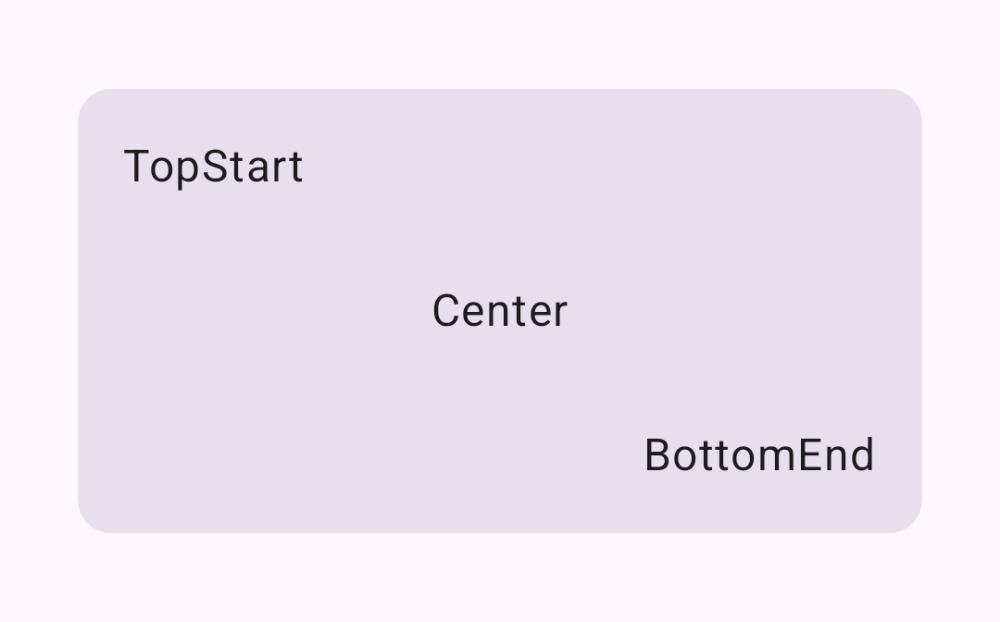
Aligned children

Three labels anchored to different corners of the same Box.

Kotlin
Box(modifier = Modifier.fillMaxWidth().height(160.dp)) {
    Text("TopStart", Modifier.align(Alignment.TopStart))
    Text("Center", Modifier.align(Alignment.Center))
    Text("BottomEnd", Modifier.align(Alignment.BottomEnd))
}