Skip to content
Selection & Inputs

Segmented Button

Single- and multi-choice segmented selection

Segmented buttons group related options in a compact toggle. Use single choice for mutually exclusive options and multi choice for independent toggles.

Segmented Button demos rendered in Compose Playground
Pixel-accurate preview · light theme

Examples

01

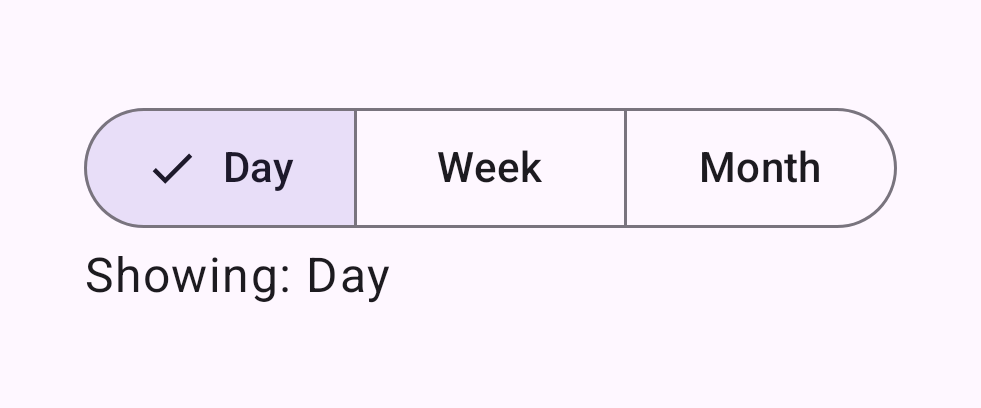
Single choice

Exactly one segment is selected at a time.

Kotlin
val options = listOf("Day", "Week", "Month")
var selectedIndex by remember { mutableStateOf(0) }
SingleChoiceSegmentedButtonRow {
    options.forEachIndexed { index, label ->
        SegmentedButton(
            selected = index == selectedIndex,
            onClick = { selectedIndex = index },
            shape = SegmentedButtonDefaults.itemShape(index, options.size)
        ) { Text(label) }
    }
}
02

Multi choice

Any combination of segments can be active at once.

Kotlin
val options = listOf("Bold", "Italic", "Underline")
val checked = remember { mutableStateListOf(false, false, false) }
MultiChoiceSegmentedButtonRow {
    options.forEachIndexed { index, label ->
        SegmentedButton(
            checked = checked[index],
            onCheckedChange = { checked[index] = it },
            shape = SegmentedButtonDefaults.itemShape(index, options.size)
        ) { Text(label) }
    }
}