Skip to content
Text & Fields

Text & Typography

Type scale, annotated spans, overflow, and selection

Text renders strings using the Material 3 type scale. It supports rich, inline styling via AnnotatedString, truncation with TextOverflow, and user text selection through SelectionContainer.

Text & Typography demos rendered in Compose Playground
Pixel-accurate preview · light theme

Examples

01

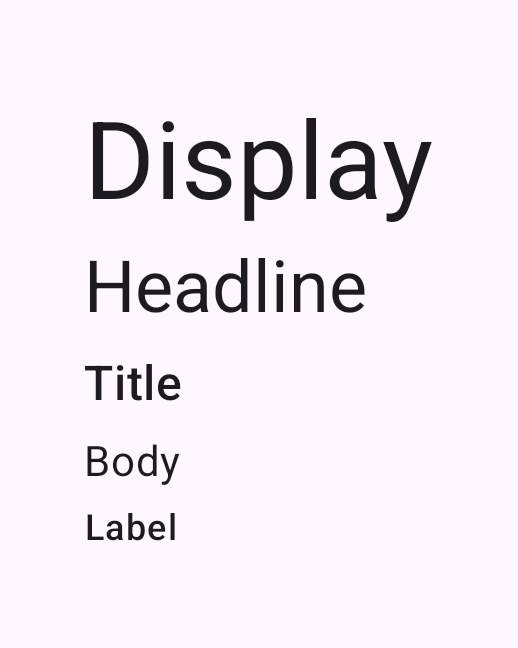
Type scale

The Material 3 type scale ranges from display down to label.

Kotlin
Text("Display", style = MaterialTheme.typography.displaySmall)
Text("Headline", style = MaterialTheme.typography.headlineSmall)
Text("Title", style = MaterialTheme.typography.titleMedium)
Text("Body", style = MaterialTheme.typography.bodyMedium)
Text("Label", style = MaterialTheme.typography.labelMedium)
02

Annotated spans

buildAnnotatedString applies bold, italic, underline, and color spans.

Kotlin
Text(buildAnnotatedString {
    withStyle(SpanStyle(fontWeight = FontWeight.Bold)) { append("Bold ") }
    withStyle(SpanStyle(fontStyle = FontStyle.Italic)) { append("italic ") }
    withStyle(SpanStyle(textDecoration = TextDecoration.Underline)) { append("underline ") }
    withStyle(SpanStyle(color = MaterialTheme.colorScheme.primary)) { append("color") }
})
03

Overflow

Limit lines and truncate the remainder with an ellipsis.

Kotlin
Text(
    text = longText,
    maxLines = 2,
    overflow = TextOverflow.Ellipsis
)
04

Selection

Wrap text in a SelectionContainer to make it user-selectable.

Kotlin
SelectionContainer {
    Text("Press and hold to select and copy this text.")
}